
授权
授权是验证用户是否有足够权限执行某项操作的过程。
Checking for permission
您可以使用 \Yiisoft\User\CurrentUser 服务来检查用户是否具有特定权限:
namespace App\Blog\Post;

use Yiisoft\User\CurrentUser;
use Yiisoft\Router\HydratorAttribute\RouteArgument;
use Psr\Http\Message\ResponseInterface;

final readonly class PostController
{
    public function __construct(
        private PostRepositoryInterface $postRepository,
        private CurrentUser $user
    )
    {
    }

    public function update(#[RouteArgument('id')] int $id): ResponseInterface
    {
        $post = $this->postRepository->findByPK($id);
        if ($post === null) {
            // respond with 404
        }

        if (!$this->canCurrentUserUpdatePost($post)) {
            // respond with 403
        }

        // continue with updating the post
    }

    private function canCurrentUserUpdatePost(Post $post): bool
    {
        return $post->getAuthorId() === $this->user->getId() &&
            $this->user->can('updatePost');
    }
}在幕后,Yiisoft\User\CurrentUser::can() 方法调用 Yiisoft\Access\AccessCheckerInterface::userHasPermission(),因此您应该在依赖容器中提供一个实现才能使其工作。
Role-based access control (RBAC)
基于角色的访问控制 (RBAC) 提供了一种简单而强大的集中式访问控制。有关 RBAC 与其他更传统的访问控制方案的比较详情,请参阅 Wikipedia。
Yii 实现了通用分层 RBAC,遵循 NIST RBAC 模型。
使用 RBAC 涉及两部分工作。第一部分是构建 RBAC 授权数据,第二部分是在必要的地方使用授权数据执行访问检查。由于 RBAC 实现了 \Yiisoft\Access\AccessCheckerInterface,使用它类似于使用任何其他访问检查器的实现。
为了便于接下来的描述,首先介绍一些基本的 RBAC 概念。
Basic concepts
角色代表一组权限(例如,创建文章、更新文章)。您可以将角色分配给一个或多个用户。要检查用户是否具有指定的权限,您可以检查用户是否具有包含该权限的角色。
每个角色或权限可能关联一个规则。规则代表访问检查器将执行的一段代码,用于决定相应的角色或权限是否适用于当前用户。例如,“更新文章”权限可能有一个规则来检查当前用户是否是文章创建者。在访问检查期间,如果用户不是文章创建者,则没有“更新文章”权限。
角色和权限都处于层次结构中。特别是,一个角色可以由其他角色或权限组成。一个权限可以由其他权限组成。Yii 实现了偏序层次结构,其中包括更特殊的树层次结构。虽然角色可以包含权限,但反之则不成立。
Configuring RBAC
Yii RBAC 需要提供存储。
可以安装以下存储之一:
- PHP storage — PHP 文件存储;
- DB storage — 基于 Yii DB 的数据库存储;
- Cycle DB storage — 基于 Cycle DBAL 的数据库存储。
您还可以使用 yiisoft/rbac 包提供自己的存储。
Configuring RBAC with the PHP storage
安装 yiisoft/rbac-php 包:
composer require yiisoft/rbac-php在开始定义授权数据和执行访问检查之前,您需要在依赖容器中配置 Yiisoft\Access\AccessCheckerInterface:
use Yiisoft\Rbac\ItemsStorageInterface;
use Yiisoft\Rbac\AssignmentsStorageInterface;
use Yiisoft\Rbac\ManagerInterface;
use Yiisoft\Rbac\Php\ItemsStorage;
use Yiisoft\Rbac\Php\AssignmentsStorage;
use Yiisoft\Access\AccessCheckerInterface;
use Yiisoft\User\CurrentUser;

return [
    // ...
    ItemsStorageInterface::class => [
        'class' => ItemsStorage::class,
        '__construct()' => [
            'filePath' => $params['rbacItemsStorageFilePath']
        ]
    ],
    AssignmentsStorageInterface::class => [
        'class' => AssignmentsStorage::class,
        '__construct()' => [
            'filePath' => $params['rbacAssignmentsStorageFilePath']
        ]
    ],
    AccessCheckerInterface::class => ManagerInterface::class,

    CurrentUser::class => [
        'withAccessChecker()' => [Reference::to(AccessCheckerInterface::class)]
    ],
];
Yiisoft\Rbac\Manager 使用 PHP 脚本文件来存储授权数据。如果您想在线更改权限层次结构,请确保该目录及其中的所有文件都可由 Web 服务器进程写入。
Configuring RBAC with the DB storage
安装 yiisoft/rbac-db 包:
composer require yiisoft/rbac-db安装以下驱动程序之一:
- SQLite(最低要求版本为 3.8.3)
- MySQL
- PostgreSQL
- Microsoft SQL Server
- Oracle
配置连接。
在开始定义授权数据和执行访问检查之前,您需要在依赖容器中配置 Yiisoft\Access\AccessCheckerInterface:
use Yiisoft\Rbac\ItemsStorageInterface;
use Yiisoft\Rbac\AssignmentsStorageInterface;
use Yiisoft\Rbac\ManagerInterface;
use Yiisoft\Rbac\Db\ItemsStorage;
use Yiisoft\Rbac\Db\AssignmentsStorage;
use Yiisoft\Access\AccessCheckerInterface;

return [
    // ...
    ItemsStorageInterface::class => ItemsStorage::class,
    AssignmentsStorageInterface::class => AssignmentsStorage::class,
    AccessCheckerInterface::class => ManagerInterface::class,
];
将 RBAC DB storage 迁移路径添加到 params.php:
return [
    // ...
    'yiisoft/db-migration' => [
        'sourcePaths' => [
             __DIR__ . '/../../vendor/yiisoft/rbac-db/migrations/items',
             __DIR__ . '/../../vendor/yiisoft/rbac-db/migrations/assignments',
        ],
    ],
];
应用迁移:
./yii migrate:upBuilding authorization data
构建授权数据涉及以下任务:
- 定义角色和权限;
- 建立角色和权限之间的关系;
- 定义规则;
- 将规则与角色和权限关联;
- 将角色分配给用户。
根据授权灵活性要求,您可以以不同的方式完成这些任务。如果只有开发人员更改您的权限层次结构,您可以使用迁移或控制台命令。迁移的优点是您可以与其他迁移一起执行它。控制台命令的优点是您可以在代码中很好地概览层次结构,而无需阅读许多迁移。
无论哪种方式,最终您都会得到以下 RBAC 层次结构:
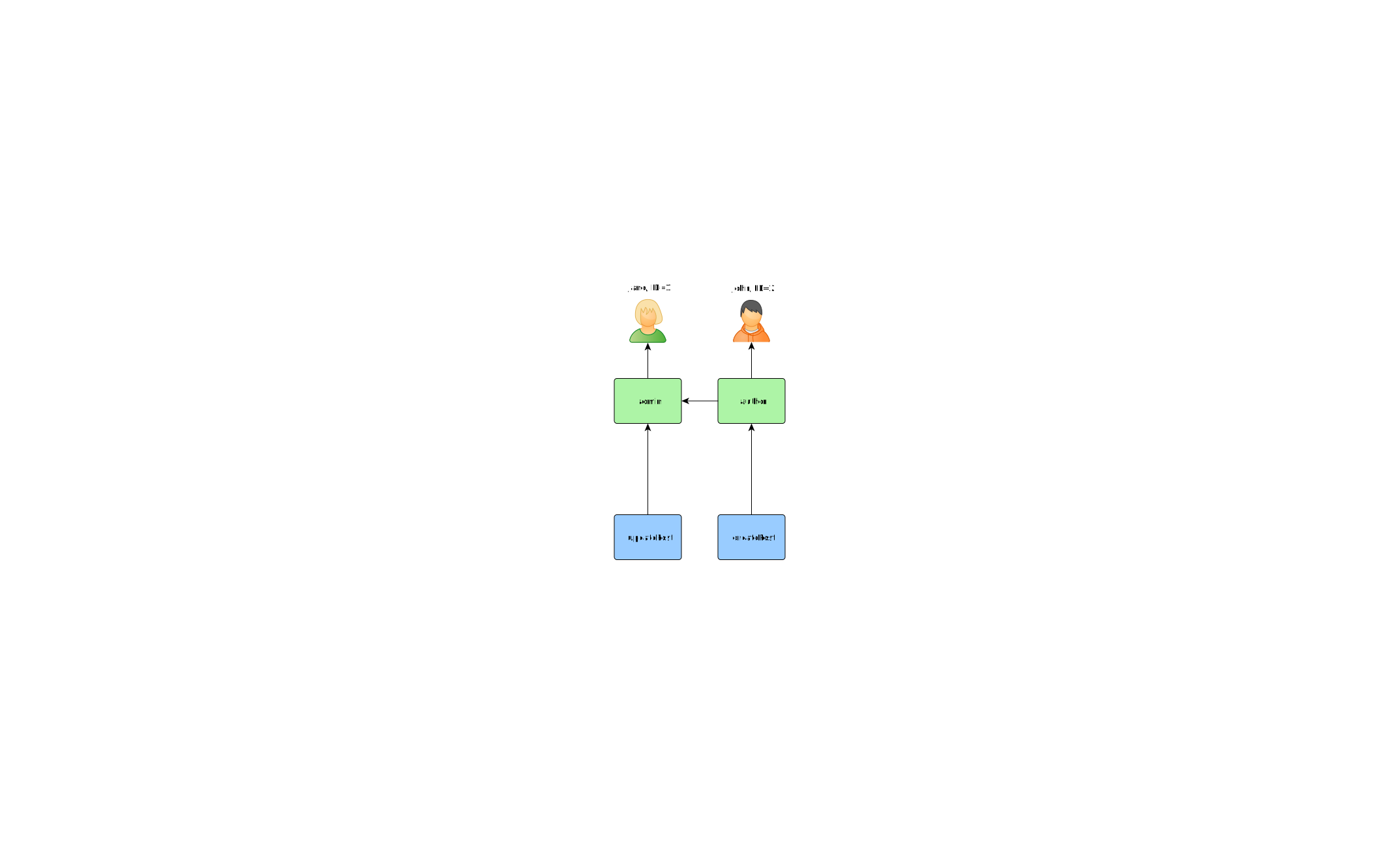
如果您想动态构建权限层次结构,则需要 UI 或控制台命令。用于构建层次结构本身的 API 不会有所不同。
使用控制台命令
如果您的权限层次结构根本不会改变,并且您有固定数量的用户,则可以创建一个控制台命令,通过 \Yiisoft\Rbac\ManagerInterface 提供的 API 一次性初始化授权数据:
<?php
namespace App\Command;

use Symfony\Component\Console\Attribute\AsCommand;
use Symfony\Component\Console\Command\Command;
use Symfony\Component\Console\Input\InputInterface;
use Symfony\Component\Console\Output\OutputInterface;
use Yiisoft\Rbac\ManagerInterface;
use Yiisoft\Rbac\Permission;
use Yiisoft\Rbac\Role;
use Yiisoft\Yii\Console\ExitCode;

#[AsCommand(
    name: 'rbac:init',
    description: 'Builds RBAC hierarchy',
)]
final class RbacCommand extends Command
{
    private const CREATE_POST_PERMISSION = 'createPost';
    private const UPDATE_POST_PERMISSION = 'updatePost';
    private const ROLE_AUTHOR = 'author';
    private const ROLE_ADMIN = 'admin';

    public function __construct(private ManagerInterface $manager)
    {
        parent::__construct();
    }

    protected function execute(InputInterface $input, OutputInterface $output): int
    {
        $this->removeAll();

        $this->manager->addPermission((new Permission(RbacCommand::CREATE_POST_PERMISSION))->withDescription('Create a post'));
        $this->manager->addPermission((new Permission(RbacCommand::UPDATE_POST_PERMISSION))->withDescription('Update post'));

        // add the "author" role and give this role the "createPost" permission
        $this->manager->addRole(new Role(RbacCommand::ROLE_AUTHOR));
        $this->manager->addChild(RbacCommand::ROLE_AUTHOR, RbacCommand::CREATE_POST_PERMISSION);

        // add the "admin" role and give this role the "updatePost" permission
        // as well as the permissions of the "author" role
        $this->manager->addRole(new Role(RbacCommand::ROLE_ADMIN));
        $this->manager->addChild(RbacCommand::ROLE_ADMIN, RbacCommand::UPDATE_POST_PERMISSION);
        $this->manager->addChild(RbacCommand::ROLE_ADMIN, RbacCommand::ROLE_AUTHOR);

        // Assign roles to users. 1 and 2 are IDs returned by IdentityInterface::getId()
        // usually implemented in your User model.
        $this->manager->assign(RbacCommand::ROLE_AUTHOR, 2);
        $this->manager->assign(RbacCommand::ROLE_ADMIN, 1);

        return ExitCode::OK;
    }

    private function removeAll(): void
    {
        $this->manager->revokeAll(2);
        $this->manager->revokeAll(1);

        $this->manager->removeRole(RbacCommand::ROLE_ADMIN);
        $this->manager->removeRole(RbacCommand::ROLE_AUTHOR);

        $this->manager->removePermission(RbacCommand::CREATE_POST_PERMISSION);
        $this->manager->removePermission(RbacCommand::UPDATE_POST_PERMISSION);
    }
}
将命令添加到 config/console/commands.php:
return [
    // ...
    'rbac:init' => App\Command\RbacCommand::class
];
您可以通过以下方式从控制台执行上述命令:
./yii rbac:init如果您不想硬编码哪些用户具有某些角色,请不要在命令中放入
->assign()调用。相反, 创建 UI 或控制台命令来管理分配。
使用迁移
TODO:在实现迁移时完成它。
您可以使用 迁移 通过 \Yiisoft\Rbac\ManagerInterface 提供的 API 初始化和更改层次结构。
Create new migration using ./yii migrate:create init_rbac then implement creating a hierarchy:
<?php
namespace App\Migration;

use Yiisoft\Db\Migration\MigrationBuilder;
use Yiisoft\Db\Migration\RevertibleMigrationInterface;
use Yiisoft\Rbac\ManagerInterface;
use Yiisoft\Rbac\Permission;
use Yiisoft\Rbac\Role;

final class M260112125812InitRbac implements RevertibleMigrationInterface
{
    private const CREATE_POST_PERMISSION = 'createPost';
    private const UPDATE_POST_PERMISSION = 'updatePost';
    private const ROLE_AUTHOR = 'author';
    private const ROLE_ADMIN = 'admin';

    public function __construct(private ManagerInterface $manager)
    {
    }

    public function up(MigrationBuilder $b): void
    {
        $this->manager->addPermission((new Permission(M260112125812InitRbac::CREATE_POST_PERMISSION))->withDescription('Create a post'));
        $this->manager->addPermission((new Permission(M260112125812InitRbac::UPDATE_POST_PERMISSION))->withDescription('Update post'));

        // add the "author" role and give this role the "createPost" permission
        $this->manager->addRole(new Role(M260112125812InitRbac::ROLE_AUTHOR));
        $this->manager->addChild(M260112125812InitRbac::ROLE_AUTHOR, M260112125812InitRbac::CREATE_POST_PERMISSION);

        // add the "admin" role and give this role the "updatePost" permission
        // as well as the permissions of the "author" role
        $this->manager->addRole(new Role(M260112125812InitRbac::ROLE_ADMIN));
        $this->manager->addChild(M260112125812InitRbac::ROLE_ADMIN, M260112125812InitRbac::UPDATE_POST_PERMISSION);
        $this->manager->addChild(M260112125812InitRbac::ROLE_ADMIN, M260112125812InitRbac::ROLE_AUTHOR);

        // Assign roles to users. 1 and 2 are IDs returned by IdentityInterface::getId()
        // usually implemented in your User model.
        $this->manager->assign(M260112125812InitRbac::ROLE_AUTHOR, 2);
        $this->manager->assign(M260112125812InitRbac::ROLE_ADMIN, 1);
    }

    public function down(MigrationBuilder $b): void
    {
        $this->manager->revokeAll(2);
        $this->manager->revokeAll(1);

        $this->manager->removeRole(M260112125812InitRbac::ROLE_ADMIN);
        $this->manager->removeRole(M260112125812InitRbac::ROLE_AUTHOR);

        $this->manager->removePermission(M260112125812InitRbac::CREATE_POST_PERMISSION);
        $this->manager->removePermission(M260112125812InitRbac::UPDATE_POST_PERMISSION);
    }
}
如果您不想硬编码哪些用户具有某些角色,请不要在迁移中放入
->assign()调用。相反, 创建 UI 或控制台命令来管理分配。
You could apply migration by using ./yii migrate:up.
将角色分配给用户
TODO:在演示/模板中实现注册时更新。
作者可以创建文章,管理员可以更新文章并执行作者可以执行的所有操作。
如果您的应用程序允许用户注册,您需要立即将角色分配给这些新用户。例如,为了让所有注册用户在您的高级项目模板中成为作者,您需要按如下方式更改 frontend\models\SignupForm::signup():
public function signup()
{
    if ($this->validate()) {
        $user = new User();
        $user->username = $this->username;
        $user->email = $this->email;
        $user->setPassword($this->password);
        $user->generateAuthKey();
        $user->save(false);

        // the following three lines were added:
        $authorRole = $this->manager->getRole('author');
        if ($authorRole !== null) {
            $this->manager->assign($authorRole->getName(), $user->getId());
        }

        return $user;
    }

    return null;
}
对于需要复杂访问控制和动态更新授权数据的应用程序(例如管理面板),您可能需要使用 Yiisoft\Rbac\Manager 提供的 API 开发特殊的用户界面。
Using rules
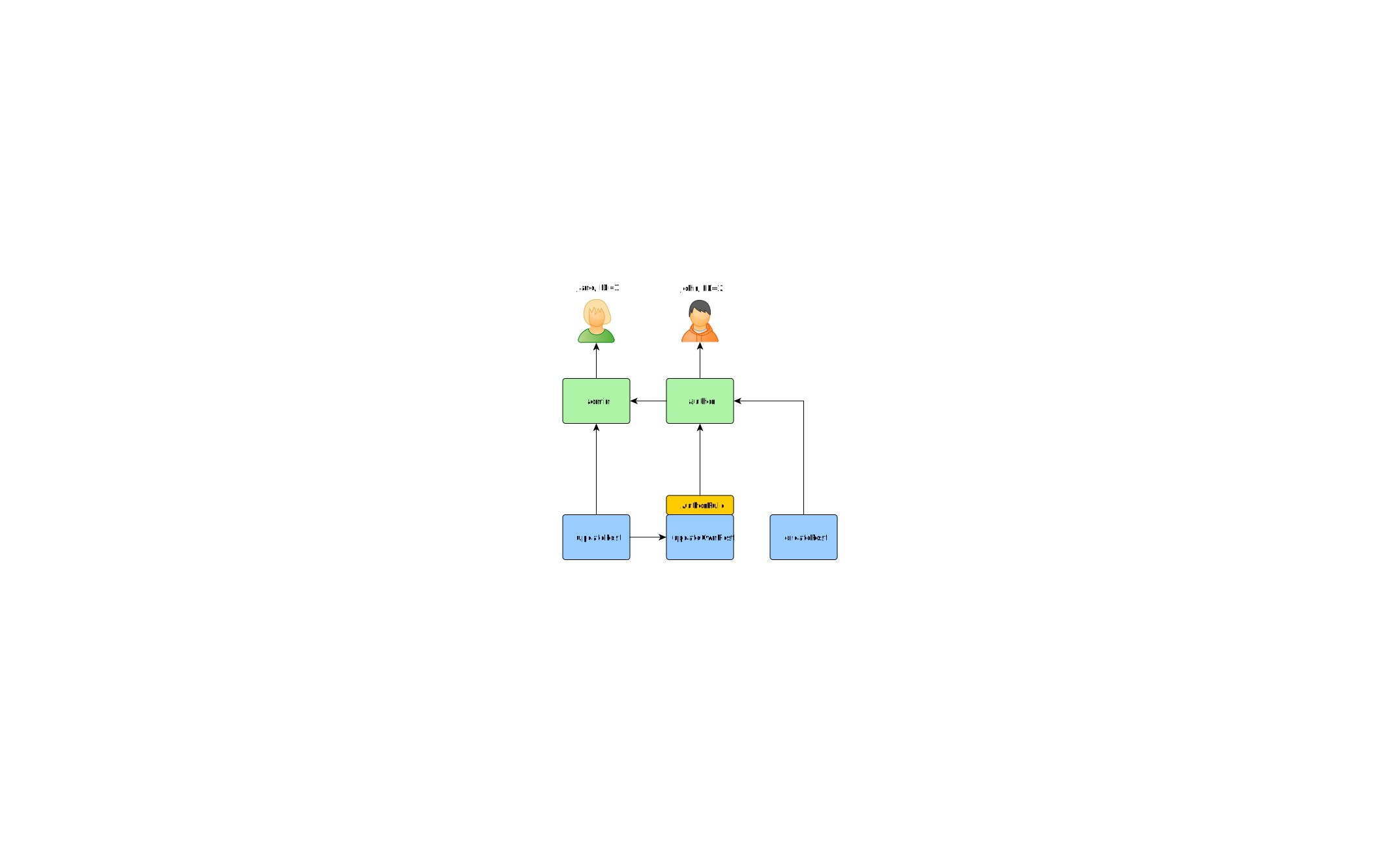
如前所述,规则为角色和权限添加了额外的约束。规则是从 \Yiisoft\Rbac\Rule 扩展的类。它必须实现 execute() 方法。在您之前创建的层次结构中,作者无法编辑自己的文章。让我们修复它。首先,您需要一个规则来验证用户是文章作者:
namespace App\User\Rbac;

use Yiisoft\Rbac\Item;
use Yiisoft\Rbac\RuleContext;
use Yiisoft\Rbac\RuleInterface;

/**
 * Checks if the authorID matches user passed via params.
 */
final readonly class AuthorRule implements RuleInterface
{
    public function execute(?string $userId, Item $item, RuleContext $context): bool
    {
        $post = $context->getParameterValue('post');
        return $post !== null && $post->getAuthorId() == $userId;
    }
}
该规则检查用户是否创建了 post。在您之前使用的命令中创建一个特殊权限 updateOwnPost:
use Yiisoft\Rbac\Permission;
use Yiisoft\Rbac\ManagerInterface;

// add the "updateOwnPost" permission and associate the rule with it.
$updateOwnPost = (new Permission('updateOwnPost'))
    ->withDescription('Update own post')
    ->withRuleName(AuthorRule::class);
$this->manager->addPermission($updateOwnPost);

// "updateOwnPost" will be used from "updatePost"
$this->manager->addChild($updateOwnPost->getName(), $updatePost->getName());

// allow "author" to update their own posts
$this->manager->addChild($authorRole->getName(), $updateOwnPost->getName());

// Remove this line since we don't want the AuthorRule to be applied to the 'admin' role
$this->manager->addChild('admin', 'author');
现在您得到了以下层次结构:
Access check
检查的方式与本指南第一部分中的方式类似:
namespace App\Blog\Post;

use Yiisoft\User\CurrentUser;
use Yiisoft\Router\HydratorAttribute\RouteArgument;
use Psr\Http\Message\ResponseInterface;

final readonly class PostController
{
    public function __construct(
        private PostRepositoryInterface $postRepository,
        private CurrentUser $user
    )
    {
    }

    public function update(#[RouteArgument('id')] int $id): ResponseInterface
    {
        $post = $this->postRepository->findByPK($id);
        if ($post === null) {
            // respond with 404
        }

        if (!$this->canCurrentUserUpdatePost($post)) {
            // respond with 403
        }

        // continue with updating the post
    }

    private function canCurrentUserUpdatePost(Post $post): bool
    {
        return $this->user->can('updatePost', ['post' => $post]);
    }
}
不同之处在于,现在检查用户自己的文章是 RBAC 的一部分。
如果当前用户是 Jane,ID=1,您从 createPost 开始并尝试到达 Jane:
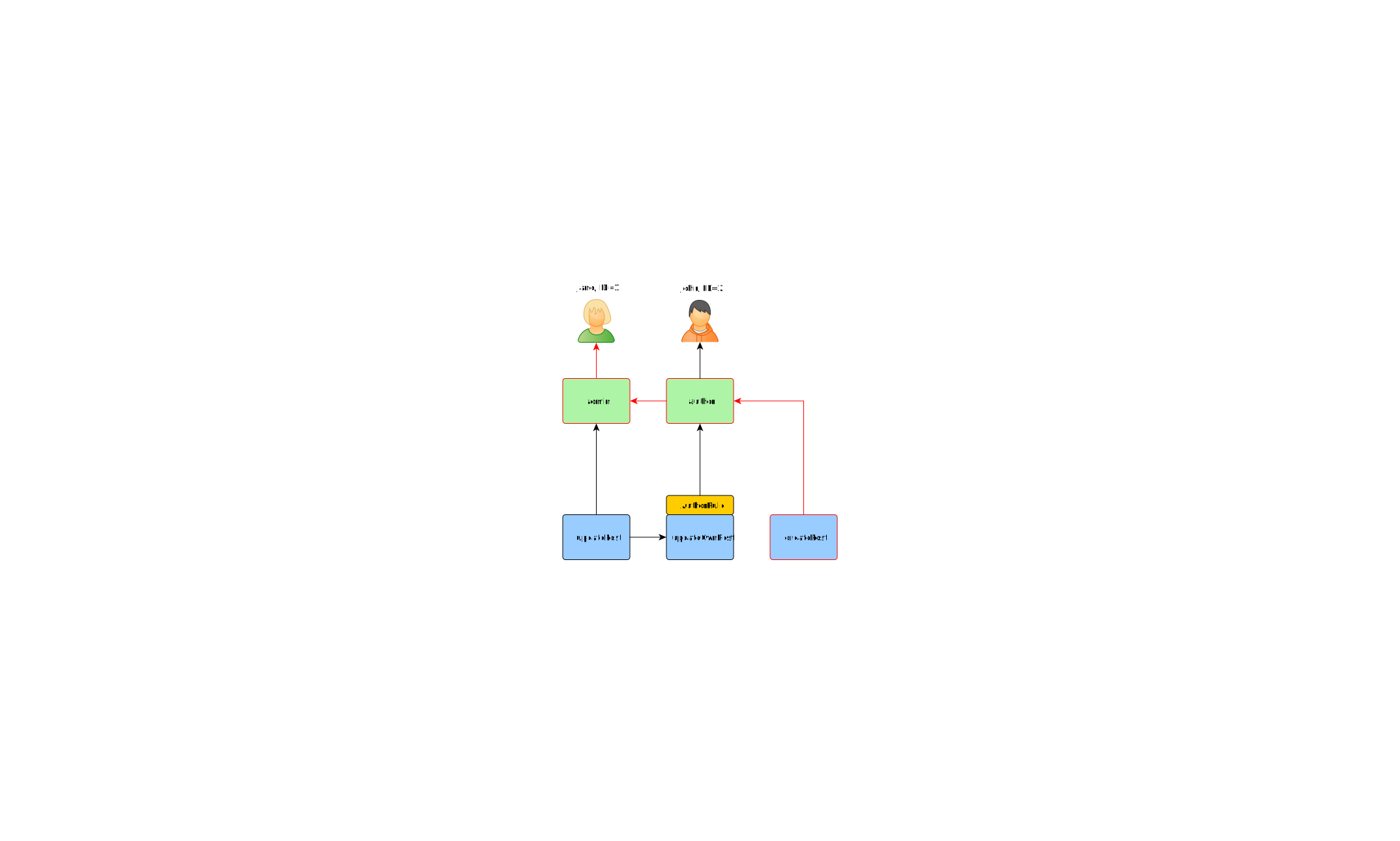
要检查用户是否可以更新文章,您需要传递之前描述的 AuthorRule 所需的额外参数:
if ($user->can('updatePost', ['post' => $post])) {
    // update post
}
如果当前用户是 John,会发生以下情况:
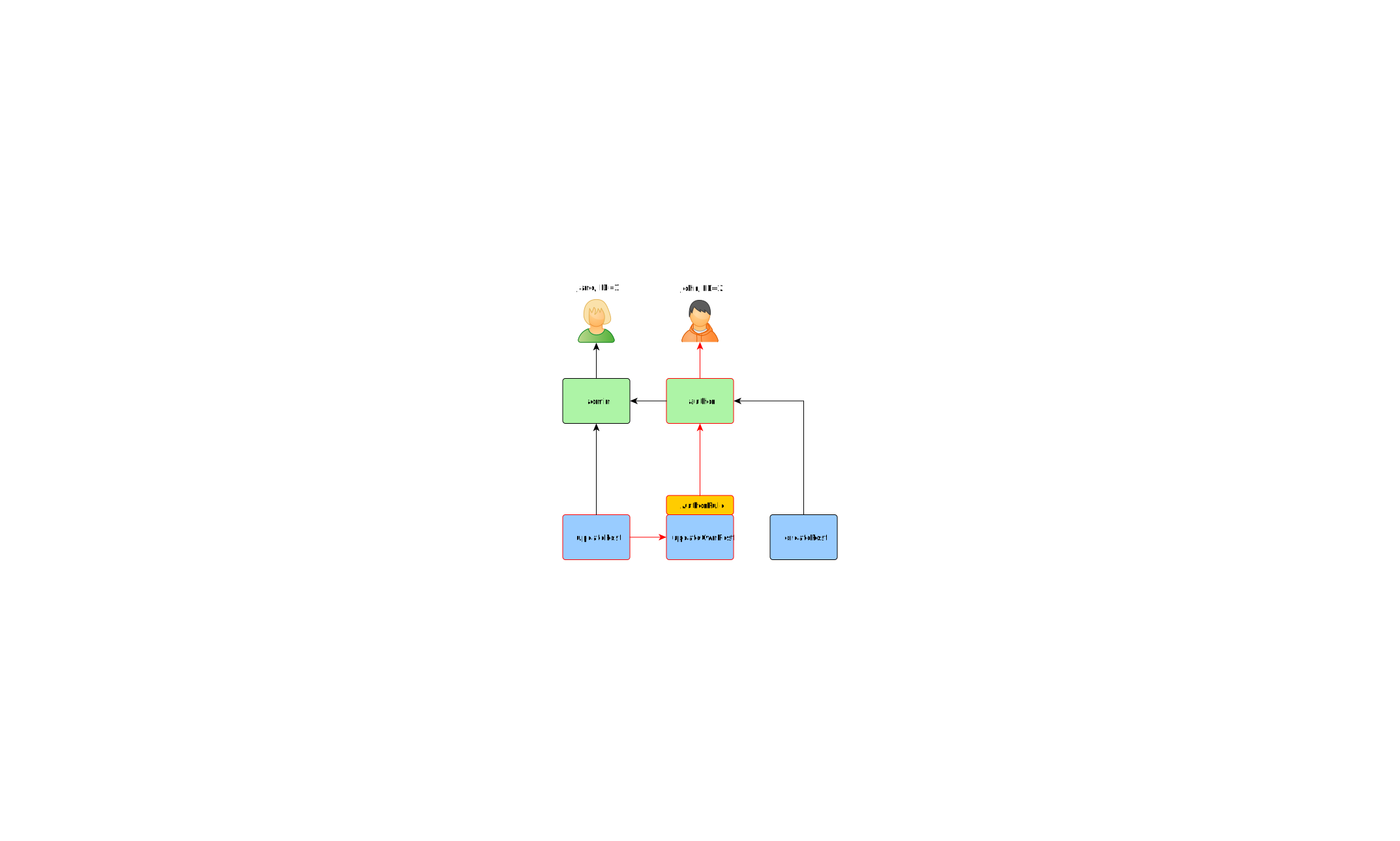
您从 updatePost 开始并通过 updateOwnPost。要通过访问检查,AuthorRule 应该从其 execute() 方法返回 true。该方法从 can() 方法调用接收其 $params,因此值为 ['post' => $post]。 如果一切正常,您将到达分配给 John 的 author。
在 Jane 的情况下,这更简单,因为她是管理员:
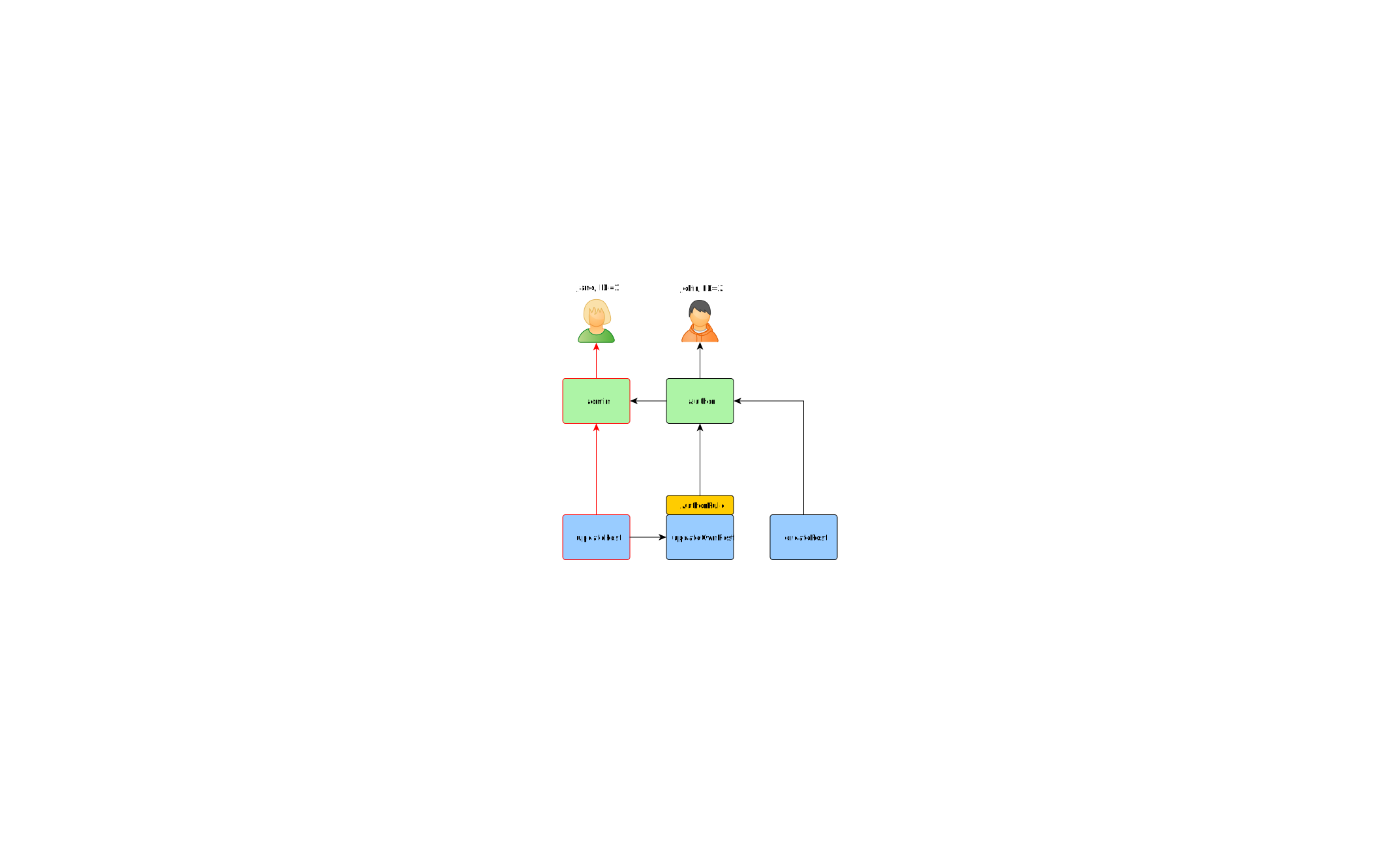
实现您自己的访问检查器
如果 RBAC 不适合您的需求,您可以在不更改应用程序代码的情况下实现自己的访问检查器:
namespace App\User;

use \Yiisoft\Access\AccessCheckerInterface;

final readonly class AccessChecker implements AccessCheckerInterface
{
    private const PERMISSIONS = [
        [
            1 => ['editPost'],
            42 => ['editPost', 'deletePost'],
        ],
    ];

    public function userHasPermission($userId, string $permissionName, array $parameters = []) : bool
    {
        if (!array_key_exists($userId, self::PERMISSIONS)) {
            return false;
        }

        return in_array($permissionName, self::PERMISSIONS[$userId], true);
    }
}