
Working with forms
This section continues to improve on "Saying Hello." Instead of using URL, you will now ask a user for a message via form.
Through this tutorial, you will learn how to:
- Create a form model to represent the data entered by a user through a form.
- Declare rules to validate the data entered.
- Build an HTML form in a view.
Installing form package
To install form package, issue the following command in your application directory:
composer require yiisoft/form-modelFor Docker that would be:
make composer require yiisoft/form-modelCreating a form
The data to be requested from the user will be represented by a Form class as shown below and saved in the file /src/Web/Echo/Form.php:
<?php

declare(strict_types=1);

namespace App\Web\Echo;

use Yiisoft\FormModel\FormModel;
use Yiisoft\Validator\Label;
use Yiisoft\Validator\Rule\Length;

final class Form extends FormModel
{
    #[Label('The message to be echoed')]
    #[Length(min: 2)]
    public string $message = '';
}
In the above example, the Form has a single string property $message which length should be at least of two characters. There's also a custom label for the property.
Note: Validation attributes are Yii Validator rules. For common checks, first look for an existing rule. If a field also needs application-specific validation, use
Callbackfor that domain logic. With PHP attributes, use themethodoption because PHP attributes can't contain closures. For example, validate UUID syntax withUuid, then add#[Callback(method: 'validateUuidV7', skipOnError: true)]only when your domain specifically requires UUID version 7.
use Yiisoft\Validator\Result;
use Yiisoft\Validator\Rule\Callback;
use Yiisoft\Validator\Rule\Uuid;

#[Uuid(skipOnError: true)]
#[Callback(method: 'validateUuidV7', skipOnError: true)]
public string $id = '';

private function validateUuidV7(mixed $value): Result
{
    return \App\Support\Uuid::isVersion7($value)
        ? new Result()
        : (new Result())->addError('ID must be a UUID version 7.');
}
The callback method returns a Result: return an empty result when the value is valid or add an error when it isn't. The method body can call any validation code your application already uses, such as App\Support\Uuid::isValid($value, 'v7'). See Callback rule details for full examples and available method signatures.
For validation logic reused in several forms, create a custom Yii Validator rule and handler instead of copying callback methods. See the custom rule guide for the rule/handler structure.
Custom validation
Validation attributes are Yii Validator rules. For common checks, first look for an existing rule. For example, to validate a UUID string, use Uuid:
use Yiisoft\FormModel\FormModel;
use Yiisoft\Validator\Rule\Uuid;

final class Form extends FormModel
{
    #[Uuid]
    public string $id = '';
}
When a field needs application-specific validation that isn't covered by a built-in rule, use Callback. This is useful for one-off checks or for delegating to a domain/library method. With PHP attributes, use the method option because PHP attributes can't contain closures. For example, the following form validates a card number checksum:
<?php

declare(strict_types=1);

namespace App\Web\Echo;

use Yiisoft\FormModel\FormModel;
use Yiisoft\Validator\Label;
use Yiisoft\Validator\Result;
use Yiisoft\Validator\Rule\Callback;
use Yiisoft\Validator\Rule\Required;
use Yiisoft\Validator\ValidationContext;

final class Form extends FormModel
{
    #[Label('Card number')]
    #[Required]
    #[Callback(method: 'validateCardNumberChecksum', skipOnError: true)]
    public string $cardNumber = '';

    private function validateCardNumberChecksum(mixed $value, Callback $rule, ValidationContext $context): Result
    {
        if (!is_string($value)) {
            return (new Result())->addError('Card number must be a string.');
        }

        $digits = str_replace([' ', '-'], '', $value);

        if ($digits === '' || !ctype_digit($digits)) {
            return (new Result())->addError('Card number must contain digits only.');
        }

        $sum = 0;
        $double = false;

        foreach (array_reverse(str_split($digits)) as $digit) {
            $number = (int) $digit;

            if ($double) {
                $number *= 2;
                if ($number > 9) {
                    $number -= 9;
                }
            }

            $sum += $number;
            $double = !$double;
        }

        if ($sum % 10 !== 0) {
            return (new Result())->addError('Card number checksum is invalid.');
        }

        return new Result();
    }
}
The callback method returns a Result: return an empty result when the value is valid or add an error when it isn't. The method body can call any validation code your application already uses, such as App\Payment\CardNumber::hasValidChecksum($value).
For validation logic reused in several forms, create a custom Yii Validator rule and handler instead of copying callback methods. See the custom rule guide for the rule/handler structure.
Validating several fields together
Property attributes are enough when each field can be validated independently. When a rule depends on several fields, put a Callback rule on the form model class and attach an error to the field that should display it.
For example, a report filter may require the start date to be earlier than or equal to the end date:
<?php

declare(strict_types=1);

namespace App\Web\Report;

use DateTimeImmutable;
use Yiisoft\FormModel\FormModel;
use Yiisoft\Validator\Result;
use Yiisoft\Validator\Rule\Callback;
use Yiisoft\Validator\Rule\Date\Date;
use Yiisoft\Validator\Rule\Required;
use Yiisoft\Validator\ValidationContext;

#[Callback(method: 'validateDateRange')]
final class ReportFilterForm extends FormModel
{
    #[Required]
    #[Date(format: 'php:Y-m-d')]
    public string $dateFrom = '';

    #[Required]
    #[Date(format: 'php:Y-m-d')]
    public string $dateTo = '';

    public function validateDateRange(mixed $value, Callback $rule, ValidationContext $context): Result
    {
        $result = new Result();

        if ($this->dateFrom === '' || $this->dateTo === '') {
            return $result;
        }

        $dateFrom = $this->parseDate($this->dateFrom);
        $dateTo = $this->parseDate($this->dateTo);

        if ($dateFrom === null || $dateTo === null) {
            return $result;
        }

        if ($dateFrom > $dateTo) {
            $result->addError('The start date must be earlier than or equal to the end date.', [], ['dateFrom']);
        }

        return $result;
    }

    private function parseDate(string $value): ?DateTimeImmutable
    {
        $date = DateTimeImmutable::createFromFormat('!Y-m-d', $value);
        $errors = DateTimeImmutable::getLastErrors();

        if ($date === false || ($errors !== false && ($errors['warning_count'] > 0 || $errors['error_count'] > 0))) {
            return null;
        }

        return $date;
    }
}
The class-level Callback receives the whole object as $value, but using $this is usually clearer in a form model method. Returning an empty Result means the cross-field rule passed. The third argument of addError() is the value path; ['dateFrom'] makes the error appear on the dateFrom field when rendering the form.
Using the form
Now that you have a form, use it in your action from "Saying Hello".
Here's what you end up with in /src/Web/Echo/Action.php:
<?php

declare(strict_types=1);

namespace App\Web\Echo;

use Psr\Http\Message\ResponseInterface;
use Psr\Http\Message\ServerRequestInterface;
use Yiisoft\FormModel\FormHydrator;
use Yiisoft\Yii\View\Renderer\WebViewRenderer;

final readonly class Action
{
    public function __construct(
        private WebViewRenderer $viewRenderer,
        private FormHydrator $formHydrator,
    ) {}

    public function __invoke(ServerRequestInterface $request): ResponseInterface
    {
        $form = new Form();

        $this->formHydrator->populateFromPostAndValidate($form, $request);

        return $this->viewRenderer->render(__DIR__ . '/template', [
            'form' => $form,
        ]);
    }
}
Instead of reading from route, you fill your form from request's POST data and validate it with the help of FormHydrator. Next you pass the form to the view.
For the form to function we need to allow both GET to render the form and POST to send the data. Adjust your route in config/common/routes.php:
<?php

declare(strict_types=1);

use App\Web;
use Yiisoft\Http\Method;
use Yiisoft\Router\Group;
use Yiisoft\Router\Route;

return [
    Group::create()
        ->routes(
            Route::get('/')
                ->action(Web\HomePage\Action::class)
                ->name('home'),
            Route::methods([Method::GET, Method::POST], '/say')
                ->action(Web\Echo\Action::class)
                ->name('echo/say'),
        ),
];
Adjusting view
To render a form, you need to change your view, src/Web/Echo/template.php:
<?php
use App\Web\Echo\Form;
use Yiisoft\FormModel\Field;
use Yiisoft\Html\Html;
use Yiisoft\Router\UrlGeneratorInterface;
use Yiisoft\Yii\View\Renderer\Csrf;

/**
 * @var Form $form
 * @var string[] $errors
 * @var UrlGeneratorInterface $urlGenerator
 * @var Csrf $csrf
 */

$htmlForm = Html::form()
    ->post($urlGenerator->generate('echo/say'))
    ->csrf($csrf);
?>

<?= $htmlForm->open() ?>
    <?= Field::text($form, 'message')->required() ?>
    <?= Html::submitButton('Say') ?>
<?= $htmlForm->close() ?>

<?php if ($form->isValid()): ?>
    Echo said: <?= Html::encode($form->message) ?>
<?php endif ?>
If the form is valid, you display a message. The rest initializes and renders the form.
First, you initialize $htmlForm with the POST type and the action URL generated with the help from the URL generator. You can access it as $urlGenerator in all views. You also need to pass the CSRF token to the form, which is also available in every view as $csrf thanks to the view injections listed in config/common/params.php:
'yiisoft/yii-view-renderer' => [
    'injections' => [
        Reference::to(CsrfViewInjection::class),
    ],
],
The template renders the CSRF token value as a hidden input to ensure that the request originates from the form page and not from another website. It will be submitted along with POST form data. Omitting it would result in HTTP response code 422.
You use Field::text() to output "message" field, so it takes care about filling the value, escaping it, rendering field label and validation errors.
Now, in case you submit an empty message, you will get a validation error: "The message to be echoed must contain at least 2 characters."
Trying it Out
To see how it works, use your browser to access the following URL:
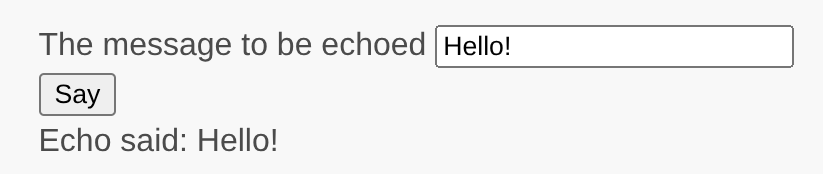
http://localhost:8080/sayYou will see a page with a form input field and a label that indicates what data to enter. Also, the form has a "submit" button labeled "Say". If you click the "submit" button without entering anything, you will see that the field is required. If you enter a single character, the form displays an error message next to the problematic input field.

After you enter a valid message and click the "submit" button, the page echoes the data that you entered.
Summary
In this section of the guide, you've learned how to create a form model class to represent the user data and validate said data.
You've also learned how to get data from users and how to display data back in the browser. This is a task that could take you a lot of time when developing an application, but Yii provides powerful widgets to make this task easy.
In the next section, you will learn how to work with databases, which are needed in nearly every application.